Support
Getting the best from Support
Whether you're thinking about using WP fail2ban or already have it installed, we're happy to help.
We've put considerable effort into explaining what WP fail2ban does on the website, and how to configure and use it in the documentation.
If you're considering WP fail2ban, please have a look at the features and comparisons first. You can also try the free version or take advantage of the 14-day Premium trial.
If you're already using WP fail2ban, the documentation is the best place to start when you have a question about installation, configuration or behaviour.
We don't expect you to be an expert, or to spend hours searching for an answer. If you can't find what you need, don't understand something, or have tried the instructions and they don't work, please ask.
Where something is already covered on the website or in the documentation, we'll usually point you to the relevant section rather than repeat it in an email.
We want to hear from you
Support isn't just about fixing problems. Many of WP fail2ban's features started life as requests or suggestions from people using the software.
If something could work better, a feature is missing, or you have an idea for improving WP fail2ban, we'd genuinely like to hear about it. We can't promise to implement every suggestion, but we do take them seriously.
Questions about whether WP fail2ban is suitable for your needs are welcome too. We'd much rather help you make an informed decision before buying.
Bug reports, questions and constructive criticism are equally welcome. They help make WP fail2ban better for everyone.
Keeping things constructive
We understand that things sometimes go wrong, and that problems can be frustrating. You don't need to be particularly diplomatic when reporting something that's broken, and we're not afraid of criticism.
But there's a difference between being frustrated and being abusive. We're people too, and a little courtesy makes it much easier to have a productive conversation. As the saying goes, you catch more flies with honey than vinegar.
We don't accept abusive or threatening communications, and may end a conversation immediately if we feel the line has been crossed.
For paid customers, that may also mean cancelling the licence and subscription and issuing a refund. The refund may exclude payment-processing fees.
Why we're explaining this
These guidelines aren't hypothetical. They're distilled from actual experience answering questions and supporting WP fail2ban.
We want to spend our time helping people, solving problems, developing new features, and improving the documentation. We also want to keep WP fail2ban affordable, which means the time we spend on individual enquiries has to be reasonable for everyone involved.
That's all we're asking: a little effort, a little courtesy, and a willingness to work together.
This page explains our approach to support. The terms of sale and refund policy are those provided by Freemius at checkout; this guidance doesn't replace them.
How To Get Support
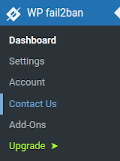 The best way to get help with WP fail2ban is to use Contact Us in the WP fail2ban dashboard.
The form automatically includes diagnostic information about your installation, so we have the details we need to start investigating your problem.
If you email us instead, we'll probably have to ask for that information anyway. That can mean several emails back and forth before we can even start looking at the problem, wasting your time and ours.
Support is available to both Free and Premium users, with Premium requests given priority.
Questions before installing?
Not sure whether WP fail2ban will work with your hosting setup, or have a question before you install it?
Email support@wp-fail2ban.com and we'll be happy to help.